Google Drive
Productivity & Tools
Keep documents together and share access without sending another attachment.
- 4.3
- Google Play rating snapshot
Official store links A distribution link is not a security certification.
Overview and practical trade-offs
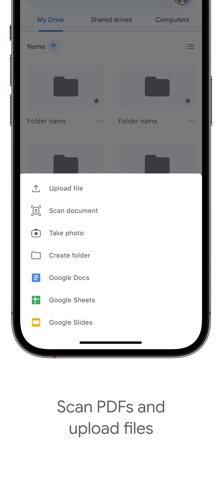
Google Drive is a file library that follows your Google account across phones and computers. It brings uploads, shared folders, document previews and search into one place. On a phone, its most practical role is often finding the correct file, scanning a paper document or changing who can open a link while away from a desk.
Start with a small folder structure and check whether each shared item is available to named people or anyone with the link. Offline access needs preparation before losing connectivity; having a document listed in the app does not necessarily mean its contents are already downloaded. Collaborative editing may open another Google app depending on the file.
Drive suits people already using Gmail or Google Workspace. Storage is shared with other Google services, and organization accounts can have additional restrictions. Treat synchronization as convenient access, then maintain an appropriate recovery plan for important originals.
Store information checked September 15, 2026. The displayed rating is from Google Play; screenshots are from the official iOS listing, so Android screens may differ. Optional subscriptions and purchases are subject to the provider’s current terms.
Where it can help
- Useful file search, previews and sharing controls in one mobile library.
- Fits naturally alongside Google documents and existing Workspace accounts.
Limitations to consider
- Storage consumption includes other services attached to the same Google account.
- Offline preparation and sharing permissions require deliberate attention.
Official store screenshots (3)
Publisher-provided store artwork · iOS. These are not Appadvizr test captures; versions and platforms may differ.


Official sources and installation
Appadvizr links only to official distribution channels. We never host installer files.